DevilEar: Pan and Volume Controller for Each Tab
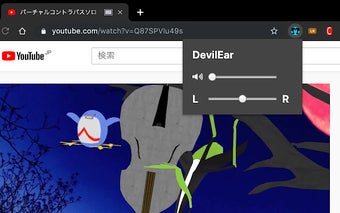
DevilEar is a free Chrome add-on developed by 塗田一帆. It falls under the category of Browsers and is specifically classified as an Add-ons & Tools program. DevilEar allows users to have control over the sound of videos or live streams on each tab through the use of pan and volume sliders.
With DevilEar, users can easily adjust the audio settings of individual tabs. This can be particularly useful when multitasking or when wanting to focus on specific content without the distraction of other audio sources. By clicking on the DevilEar icon, users gain access to the sliders, giving them the ability to fine-tune the pan and volume levels according to their preferences.
It is important to note that DevilEar has a couple of limitations. Firstly, when using this add-on, it is not possible to view videos in full screen mode, as this is a Chrome specification. Additionally, there may be compatibility issues with certain CPUs. For YouTube users, the developer recommends trying another extension called "Pan for Video," which may offer a more suitable solution.
If users encounter any problems or have questions about DevilEar, the developer can be contacted on Twitter However, it is important to note that the developer does not respond to reviews. Lastly, users should be aware that the developer is not responsible for any loss or damage that may occur as a result of using this extension.